

Dynamic Tariff (Trading Price)
Choose Trading Price in Settings → Electricity Tariff when your supplier bills you the wholesale day-ahead price plus their own mark-up, so the price you pay changes every hour or every 15 minutes. The Portal fetches the market prices for you; you only tell it how your supplier turns the market price into your price. The result feeds your profit figures and the Price-Based Control and AI Mode work modes.
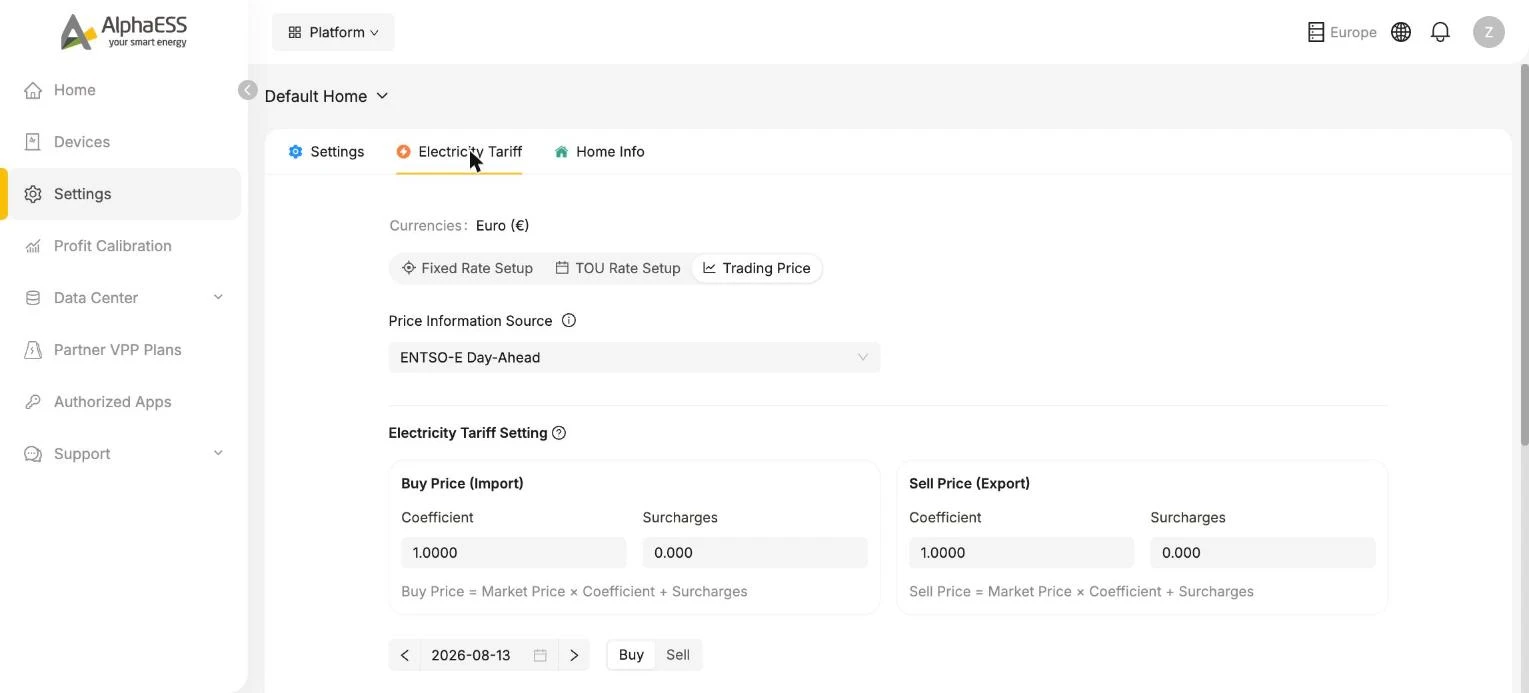
1. Price Information Source
- ENTSO-E Day-Ahead — for European markets. ENTSO-E is the European Network of Transmission System Operators for Electricity; its Transparency Platform publishes the wholesale day-ahead price for every European bidding zone, at the resolution the market uses (hourly or 15-minute). Prices for the next day are published around 13:00 CET.
- For Australia the source is the AEMO market price of your region. Here the Portal shows the published price directly and the coefficient and fees below do not apply.
A bidding zone is the area within which the wholesale price is uniform. Most countries are a single zone; Sweden, Italy, Norway and Denmark span several. If your country has more than one, a bidding-zone selector appears — pick the zone your address belongs to; the link next to it opens the ENTSO-E map of bidding zones. The ⓘ next to Price Information Source opens About Data Sources, which explains all of this and links to the ENTSO-E Transparency Platform.
2. Electricity Tariff Setting — from market price to your price
Buy and sell are configured separately, each with a factor and a per-kWh amount. The Portal shows the formula under each box:
Buy Price (Import)  = Market Price × Coefficient + Import surcharge rate
Sell Price (Export) = Market Price × Coefficient − Export fee- Coefficient — the factor your supplier applies to the market price.
1means the market price is passed through unchanged; suppliers sometimes use a factor slightly above 1 to cover grid losses, or to include VAT. - Import surcharge rate — everything added per kWh on top of the indexed buy price: the supplier's margin, grid fees, energy taxes and levies, in your currency per kWh.
- Export fee — the per-kWh amount the supplier keeps from every kWh you export. It is subtracted by default (the sign selector shows −); if your supplier instead pays a premium on top of the market price, switch the sign to +.
The note under the boxes says it well: enter only the per-kWh fee or fixed premium shown in your contract or bill. Do not enter a full feed-in tariff, or a time-based or event-based reward — those are not part of the per-kWh formula.
All prices in the Portal are in your currency per kWh. Contracts often quote the market index in €/MWh and the add-on in cents — convert both before you type them in.
Worked example — reading a dynamic contract
A Belgian supplier states its dynamic tariff (excluding VAT) as:
| Contract formula (c€/kWh) | Market index | |
|---|---|---|
| Buying | 0.8702 + 0.1039 × ESPOT_15 | ESPOT_15 = 15-minute EPEX Spot Belgium day-ahead price, in €/MWh |
| Injection (selling) | −1.3135 + 0.1000 × ESPOT_15 | same |
| Fixed fee | 100.70 €/year | not per kWh — leave out |
Converting to €/kWh: divide the cent amounts by 100, and note that 0.1039 c€/kWh per €/MWh of market price is the same as a factor of 1.039 on a €/kWh price. So the values to enter are:
| Coefficient | Per-kWh amount | |
|---|---|---|
| Buy Price (Import) | 1.039 | Import surcharge rate 0.008702 €/kWh |
| Sell Price (Export) | 1.000 | Export fee 0.013135 €/kWh, sign − |
Check with a market price of 100 €/MWh (= 0.100 €/kWh): buy = 0.100 × 1.039 + 0.008702 = 0.1126 €/kWh; sell = 0.100 × 1.000 − 0.013135 = 0.0869 €/kWh. Compare these against your supplier's app for the same quarter-hour.
INFO
The Coefficient field accepts up to 4 decimals, Import surcharge rate and Export fee up to 3 decimals. If your contract has more digits, round to the nearest value the field accepts — in the example above 0.008702 becomes 0.009 and 0.013135 becomes 0.013. The difference is well under 0.1 c/kWh and does not change which hours are cheap or expensive.
VAT: with or without?
Supplier formulas are usually quoted excluding VAT. Two ways to handle it:
- For control decisions (Price-Based Control, AI Mode) it does not matter: VAT scales every hour equally, so the cheap and expensive hours stay the same. Entering the excl.-VAT formula is fine.
- For profit figures that match your bill, include VAT on the buy side by multiplying both numbers by the VAT factor. In the example, with 6 % VAT: Coefficient 1.039 × 1.06 = 1.1013 and Import surcharge rate 0.008702 × 1.06 = 0.009224 €/kWh (entered as 1.1013 and 0.009).
Do not add VAT to the sell side unless your supplier's statement shows VAT on your injection payments — private households are usually paid the price excluding VAT.
Germany: reading a typical dynamic contract
For homes in Germany, the ⓘ next to Electricity Tariff Setting opens supplier-neutral guidance. In short:
- The ENTSO-E price is a net price before tax. If your contract passes the exchange price (Börsenpreis) through unchanged and you want bill-accurate figures, the coefficient is the VAT factor 1.19. If the contract applies its own percentage to the exchange price, apply that first, then multiply by 1.19.
- A dynamic contract's price has three parts: Grundpreis (a fixed monthly base fee — not per kWh, leave it out), Börsenpreis (the market price the Portal fetches), and the per-kWh extras: Netznutzungsentgelte (grid usage fees), Vertriebskostenaufschlag (retail markup), taxes, levies and green-energy certificates. Add the per-kWh extras together and enter the total as the Import surcharge rate.
- Always take the figures from your own bill — grid fees and retail markups vary by supplier and region.
Check the result
The chart below the settings shows the resulting buy or sell price for the selected day in €/kWh, at the market's resolution — use the date arrows and the Buy / Sell toggle. Compare a few hours with the prices in your supplier's app:
- every hour is off by the same amount → the surcharge rate or export fee is wrong;
- the gap grows with the price → the coefficient is wrong.
Nothing is applied until you click Save Configuration.
Frequently asked
Tomorrow's prices are not shown yet. Day-ahead prices are published around 13:00 CET. Until then the chart for tomorrow stays empty — check again in the afternoon.
My contract quotes cents and €/MWh, the Portal wants €/kWh. Divide cent amounts by 100. A factor written against a €/MWh index (such as 0.1039 c€/kWh per €/MWh) becomes the same figure × 10 as a plain coefficient on a €/kWh price (1.039). The worked example above walks through it.
The chart does not match my supplier's app. Compare two hours: a constant offset means the surcharge rate or export fee is wrong; a gap that grows with the price means the coefficient is wrong. Also check that the bidding zone matches your address.
My supplier pays a fixed premium on top of the market price for exports. Set the Export fee sign to + and enter the premium per kWh. Do not enter a full feed-in tariff here — only the per-kWh amount added to the market price.
Do I need Trading Price for Price-Based Control or AI Mode? Yes. Both work modes plan around your final buy and sell prices from this page — not the raw market price — and are only offered once a dynamic tariff is configured. See Home Settings.
💡 After correcting a tariff that was wrong for a while, run a Profit Calibration so your historical profit figures are recalculated with the right prices.